Updated · 8 min read · Alors On Danse AI
How to Make an Alors On Danse AI Video from 2 Photos
Learn how to make an Alors On Danse AI video from 2 photos, assign both roles and download your MP4. Includes the clip’s origins, pricing and photo tips.
Short answer: The Alors On Danse AI trend is a two-person AI face-swap meme. It recasts a white-studio comedy scene from Made in Jamel, Jamel Debbouze's 2010 sketch DVD with Stromae, so that two new people play the keyboard and dance to "Alors on danse". To make one here, upload two photos, assign the roles and get a video of about 20 seconds in 720p with the reference audio, from $9.99 with no subscription.
What is the Alors On Danse AI trend?
The Alors On Danse AI trend is a two-person AI face-swap meme based on a white-studio comedy scene set to Stromae's song "Alors on danse". The scene comes from a scripted sketch on Made in Jamel, Jamel Debbouze's 2010 comedy DVD, in which Jamel jokingly takes credit for Stromae's hit. In the AI version, two new people replace the performer at the keyboard and the performer who dances, while the studio, moves, camera cuts and music stay the same.
The recognizable setup is a white studio, a mini keyboard and a laptop on a table. One performer works at the keys while the other gestures, points at the keyboard and eventually leans toward the camera. The exchange, rather than a new dance routine, gives the two-photo version its structure.
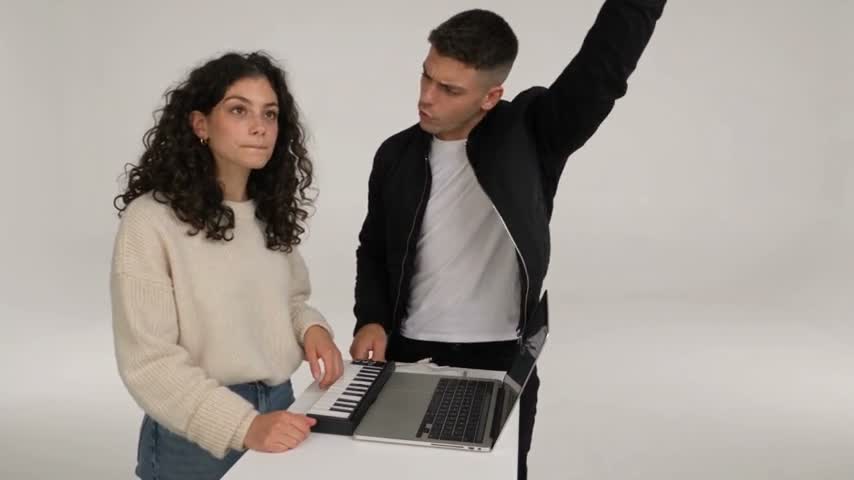
Owner-supplied demonstration at native 854×480, 480p. It illustrates the template, separate from a video made with your two photos.
Where does the clip come from?
The source is a scripted music-lesson sketch featuring Stromae and comedian Jamel Debbouze, associated with Made in Jamel. Le Parisien's December 2, 2010 review describes the DVD and their lesson together. The UniFrance-hosted 360 press kit, on printed page 23, independently records Debbouze's 2010 DVD and Stromae's participation.
A November 29, 2010 PureBreak report explains the joke: Jamel pretends he deserves credit for Stromae's hit. A contemporary Purepeople photograph and caption connects the performers to the promotional clip. The scene is comedy, not documentary evidence of who wrote the song.
The 2010 date belongs to the sketch, not to the AI trend. Those sources establish the older scene's context; they do not identify the first AI recast or a precise date when it spread. Role labels on this site describe positions in the template, without assigning either position to a named original performer.
Is this the same as the 2021 TikTok "Alors On Danse" trend?
No. Know Your Meme's 2021 entry describes a slowed-down version of the song used for dance videos on TikTok. That is a different format from replacing the two performers in the studio sketch. A shared song title can make search results look more closely related than the clips actually are.
| What people mean | Year | What it is | What people post |
|---|---|---|---|
| The Made in Jamel sketch | 2010 | A scripted comedy sketch with Jamel Debbouze and Stromae in a white studio | The original clip |
| The TikTok "Alors On Danse" trend | 2021 | A slowed-down version of the song used for dance videos | Group or solo dance clips |
| The Alors On Danse AI trend | 2026 | AI recasts of the 2010 studio sketch with two new people | Face-swapped versions of the sketch |
The 2026 row identifies the current AI format covered by this guide. It does not establish its first-post date. When choosing a template, compare the actual scene and roles rather than the soundtrack name alone.
What stays and what changes in the AI version?
The reference supplies the white studio, keyboard, laptop, movement, camera cuts and timing. Two new people supply the cast. The fixed workflow uses Seedance 2.5 through EvoLink, with reference audio assembled into the finished MP4.
The output is about 20 seconds, 720p, and approximately 16:9 landscape. Likeness and visual details can vary, so review both roles and the closer shots before sharing. The homepage demos retain their native 480p size; the output specification does not upgrade those demos to 720p.
How do you make an Alors On Danse AI video?
- Open the generator and upload two portraits, one person per photo. Review the prepared images before continuing.
- Assign the keyboard and dancing roles. Use Swap roles if the people are in the wrong positions, then create with existing credits or choose a one-time pack.
- Follow task progress in My studio. Review the finished picture and audio, then download the MP4.
Keep the same browser and studio cookies when returning from checkout. Photo drafts selected before payment can be restored for up to 24 hours in that browser. The step-by-step guide explains payment verification, drafts and task recovery.
Which photo goes where?
Photo 1 replaces the keyboard performer. Photo 2 replaces the dancing performer, whose gestures and later close-up make that role more expressive. Consider which person you want in each part before submitting.
Use JPG, PNG or WebP, up to 10 MB, with at least 300 pixels on each side. Each photo should contain one real person with a clear face and visible clothing. Avoid group shots, face-covering accessories and dim lighting; the photo guide explains useful choices.
Should you use a template or build it yourself with Higgsfield or Seedance?
A template suits people who want this particular duet with little setup. A general video tool gives you more control, but you must supply a suitable clip, describe the roles and inspect settings yourself. Both approaches require permission to use the inputs and review of the result.
Checked 2026-10-07.
| Option | What you upload | Prompt needed? | Reference clip needed? | Output | Price |
|---|---|---|---|---|---|
| Alors On Danse AI | 2 photos | No | No, built in | About 20 s, 720p, ≈16:9 MP4 with reference audio | $9.99 for 1 video, one-time |
| DIY with a motion-transfer tool such as Higgsfield | Source clip + 2 photos | Usually | Yes, you find and trim it | Depends on the tool and settings | Credit-based; see the tool's pricing page |
| DIY with Seedance 2.5 in an app or API | Source clip + 2 photos + prompt | Yes | Yes | Depends on settings | Usage-based; see the provider's pricing page |
Higgsfield's Genjutsu documentation describes motion transfer and replacing elements using footage, references and instructions. Its controls let you direct those changes yourself. Compare the displayed credit cost and current settings before starting a render.
General tools can offer different scenes or framing depending on their settings. This template keeps the reference composition fixed and handles the role instructions for you. Choose based on whether you want the recognizable sketch or control over a new composition.
Why does my result look wrong?
If the people are reversed, check the assignments and use Swap roles before the next submission. If a face is unclear or poorly matched, try a sharper, well-lit portrait with the face visible. Keep only one person in each input.
Confirmed failed tasks return their reserved credits. If the outcome is uncertain, inspect the original task in My studio before submitting another charged request. A credit return is separate from a payment refund; contact support with the relevant order or task reference if you need help.
Can you post it, and what about music and permissions?
You can download the MP4 and upload it to a platform that accepts video. Approximately 16:9 landscape output can appear with bars or be cropped in vertical apps. Review the crop and check the destination's AI-content labels and music rules before publishing.
Use your own photos or photos of people who have agreed to this use. Including reference audio does not establish permission to use the music on every platform. Alors On Danse AI is independent and not affiliated with Stromae, Jamel Debbouze or the song's rights holders.
FAQ
How long is an Alors On Danse AI video?
About 20 seconds, in 720p, approximately 16:9 landscape MP4 with the reference audio. Generation time is separate and varies.
Do I need to write a prompt?
No. The template, roles and model settings are fixed. You upload two photos and choose who goes on the keyboard.
Who is in the original clip?
Stromae and comedian Jamel Debbouze, in a sketch from Jamel's 2010 DVD Made in Jamel.
Is the 2010 clip a real recording session?
No. It is a scripted comedy sketch in which Jamel jokingly takes credit for the song.
How much does it cost?
One-time packs: $9.99 for 1 video, $19.99 for 3 videos, $29.99 for 5 videos. No subscription.
Can I make a vertical 9:16 version?
The fixed template outputs approximately 16:9 landscape. A vertical 9:16 version is not offered.
The short version
Choose two clear portraits, assign the two roles and use the fixed template. The result follows the reference scene, with likeness and details that you should review before sharing. For an introduction in French, visit Alors On Danse IA.
Make your Alors On Danse AI video →
Sources
-
UniFrance: 360 press kit, Jamel Debbouze biography (page 23)
-
Purepeople: Stromae and Jamel in the Made in Jamel promotional clip
Product facts
- Input: 2 person photos; one person per role
- Roles: Photo 1: keyboard performer; Photo 2: dancing performer; Swap roles supported
- Video length: About 20 seconds of finished video; generation time varies
- Framing: Approximately 16:9 landscape, following the fixed reference
- Resolution / format: 720p MP4
- Audio: Reference audio assembled with the generated picture; no replacement voices
- Payment: One-time USD packs: $9.99 for 1 video (50 credits), $19.99 for 3 videos (150 credits), $29.99 for 5 videos (250 credits). No subscription; applicable taxes at checkout
- Credits: 50 credits per duet; purchased credits do not expire
- Guest access: No registration form; return using the same browser and studio cookies
- Checkout draft: Selected photos can be restored from the same browser for up to 24 hours
- Failure handling: Confirmed failures return reserved credits; uncertain outcomes stay with the original task for review